Where do you guys go to find the current law and new laws when they are added?
Current law is found here

Legit though... I know some people like Legiscan but some of the design elements I don't care for.
1.) If you're using gmail, like
givemorluv91@gmail.com, then use + to make an email variation so you can tag incoming emails, like
givemorluv91+calaw@gmail.com will stil have emails go to
givemorluv91@gmail.com.
2.) Setup a rule in your inbox so that all emails sent to
givemorluv91+calaw@gmail.com go to a specific folder
2a.) If you're not using gmail or don't like this method, you can instead sort by sender address; there's generally two:
caleginfo.notification.prod@lc.ca.gov - email address for notifications when a keyword search adds a bill to the bill tracker
capublic@lc.ca.gov - bill tracker bill status update i.e.
On 26-AUG-26 the following history action was applied:
"Re-referred to Com. on RLS. pursuant to Senate Rule 29.10(d)."
3.) Setup a new account on
https://leginfo.legislature.ca.gov/ with the
givmorluv91+calaw@gmail.com email, then login.
4.) Go to the Bill Information tab -> Text Search, then put in some keywords. For instance, firearm OR gun. hit search.
5.) Select the blue "Track the KEYWORD(S)" link.
6.) You can then remove or modify this under the My Subscriptions tab -> Track Keywords radio button.
Mine are incredibly broad and simple, and it covers almost all firearm bills but sometimes some slip through.
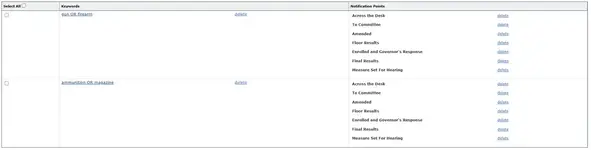
7.) When it adds a bill to track, it will be under the Bill Tracking radio button.
This is why you have this go to a different folder than your main box. It's going to pick up a bunch of stuff that isn't neccesary a gun bill. magazines will catch stuff regarding print magazines, firearm will catch laws that happen to include something where firearms are mentioned but nothing is being changed, etc. Unfortunately the keyword system isn't perfect in that because you have all those notifications points set, when you remover a bill from the bill tracker, the keyword search will pick it up again once it finds it not on your list when it reaches the next point (i.e. You remove a bill when it's in committee, then it hits the floor and the keyword tracker adds it back in again).
You'd then say "well I'll just have it add when it's introduced" and that doesn't work because legislators engage in gut and amend; it's very likely a bill will be amended into existence late in a legislative season.
Hence, my answer is just keep it all in one folder and then manually scan through and remember which bills are junk and which are ones I'm keeping an eye on.
leginfo usually updates bill status overnight. Usually. Sometimes it can be later in the evening, sometimes longer (like with a lot of bills that are held in the Suspense File are approved/denied, it has been known to take 2 - 4 days to update).