

We’re adding conversation labels for all subscribing members to help organize messages about meetups, classifieds, and events.
You can create up to 10 personal labels. Your labeled conversations stay visible in All conversations, and labels are private—only you see the ones you assign.
How to use them:
Select a label in the mailbox navigation to filter your conversations. Choose All conversations to see everything, or Unlabelled to see conversations without a label.
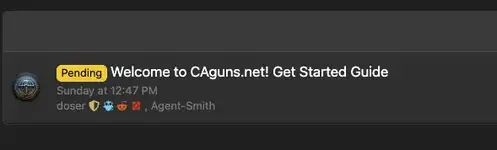
To change or remove a label, select the conversation and use Apply label again. Choose another label or Remove label. Each conversation can have one label in your mailbox.
Try it out and let me know what you think...
You can create up to 10 personal labels. Your labeled conversations stay visible in All conversations, and labels are private—only you see the ones you assign.
How to use them:
- Open your mailbox and select Labels → Create label.
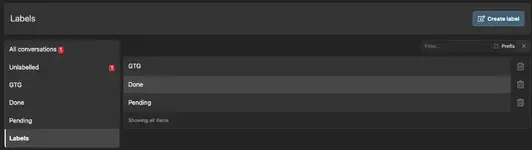
- Give it a name, such as “Good to go,” “Pending,” or “Done” choose a display style, and save.
- Return to your conversation list and check the box beside one or more conversations.
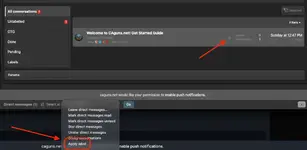
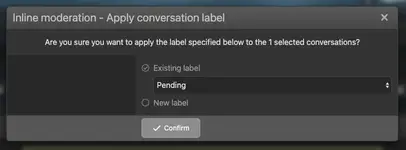
- Choose Apply label from the action menu, select your label, and confirm.
- Choose Apply label from the action menu, select your label, and confirm.
Select a label in the mailbox navigation to filter your conversations. Choose All conversations to see everything, or Unlabelled to see conversations without a label.
To change or remove a label, select the conversation and use Apply label again. Choose another label or Remove label. Each conversation can have one label in your mailbox.
Try it out and let me know what you think...