


18+ Content Warning

By clicking Enter, you confirm you are 18 years of age or older and agree to comply with all applicable local, state, and federal laws.

Notice: Any content or member activity - including anything you may buy, sell, transfer, or discuss - must comply with current and upcoming laws.

Members are encouraged to stay informed: California Firearm Laws: 2026 Outlook & 2025 Recap . Responsibility for compliance rests solely with the individual member.

  • Welcome

    Welcome to CAguns

    Join California’s gun owner community. Create a free account to join discussions and explore member features.

How To: How To Leave Feedback for Buyers

ikeo1

2A Developer 👨🏻‍💻
Staff member
CAguns Vendor
CAguns Prime
2026 25+ 2 Mostest
Messages
5,603
Classified ads
4
This part of the how to will guide you on how to provide feedback for a buyer. The process is simple and once you become familiar with it will see its pretty straight forward. The feedback system here is fully integrated into the Classifieds system and helps the community record successful transactions. This isn't a replacement for due diligence but it's one more tool to help with identifying good/reputable members.

If a buyer leaves feedback first via Leave Seller Feedback then you'll receive a notification with feedback which will be easier to leave return feedback. If the seller initiates feedback first, then follow these steps.

Note:
  1. All feedback is reviewed before its posted
  2. Shill reviews may result in permanent ban
  3. Reviews caught with duplicate accounts will be banned

If you have any questions or comments, let me know below.

Feedback for Buyers from Sellers
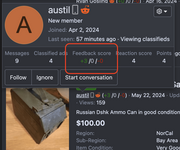
  • Click or highlight the username. This can be done in conversations or listings and click on "Feedback score"

Screenshot 2024-08-12 at 9.58.52 AM.png


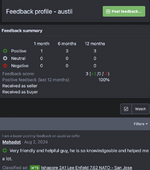
  1. After clicking onf Feedback score, you'll be taken to the Feedback profile page with the history of feedback.
  2. Click on "Post feedback".
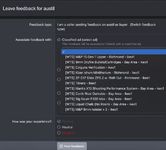
  3. Select "I am a seller leaving feedback for the buyer

Screenshot 2024-08-12 at 10.01.07 AM.png

  • You'll then select the listing you want to associate with the Feedback. Feedback is tied to the listing, and listings cannot be deleted unless requested.

  1. Fill out the fields and Click "Post feedback"
  2. This will then go into a queue for review.

Screenshot 2024-08-12 at 10.03.29 AM.png
 
Last edited:
PM the link of the person you're trying to leave feedback for. Just tried it and it's working for me.
 
Great service with fast shipping definitely placing another order in 👍🏽
 
I marked the listing as sold before I left feedback and now I can’t seem to figure out how to undo it. Any way to still post feedback for the buyer?
 
I marked the listing as sold before I left feedback and now I can’t seem to figure out how to undo it. Any way to still post feedback for the buyer?
What are you trying to undo?
 
What are you trying to undo?
Ultimately I just want to leave feedback but because I marked the listing as sold it’s not accepting the ad. I tried to “open” the ad but it still says it won’t let me leave feedback because it’s not for sale?? Any help is appreciated.
 
nuff said
 

Attachments

  • IMG_2202.webp
    IMG_2202.webp
    15.8 KB · Views: 1
I was getting forwarded to this thread when trying to post feedback on listings I'd already marked as sold. I had to re-open the listing to leave feedback and then I could mark them as sold again.
 
This setup will get updated soon…
 
how do you leave feedback for someone if when you go to their profile it says:

> This member limits who may view their full profile.
 
how do you leave feedback for someone if when you go to their profile it says:

> This member limits who may view their full profile.
You don’t need to go to their full profile, just click in the trader area at the top right of their posts or comments.
 
Back
Top Bottom