18+ Content Warning

By clicking Enter, you confirm you are 18 years of age or older and agree to comply with all applicable local, state, and federal laws.

Notice: Any content or member activity - including anything you may buy, sell, transfer, or discuss - must comply with current and upcoming laws.

Members are encouraged to stay informed: California Firearm Laws: 2026 Outlook & 2025 Recap . Responsibility for compliance rests solely with the individual member.

caguns.net

Welcome to CAguns.net!
Join our growing community where you can ask questions, share knowledge, or browse our classifieds section.

Sign up for a free account today and unlock full access! Once registered, you can search, post, and take advantage of exclusive features unavailable to guests.

A note on why more of the site now requires an account: automated scrapers and AI systems have been crawling our forums and classifieds at a scale. Requiring sign-in for those sections is the most effective tool we have. It takes a minute to register, it's free, and it keeps what happens here between actual members.

New to California gun ownership or trying to keep up with the changing laws? Check out our sister site CA2A.com — free courses, plain-English legal updates, and step-by-step guides built for California owners.

Advanced features are available only to registered members. Register today!

Help - File Upload Required

Discuss9787

⚠️ New Member | No Deposits ☢️
Messages
18
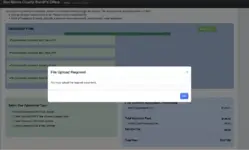
I keep running into this glitch when I'm applying for CCW in San Mateo. I already uploaded my 2x proof of residency and my DL for Photo ID, but when I hit "Complete Next Step", it says "File Upload Required". I left the gun section empty, so it shouldn't require a certificate. What do I do? See screenshot below.
 
Last edited:
refresh the page and click add file. If it still doesn't register, try a different broswer as mentioned and go through the process again.
I'm using Chrome. I only have Mac, so other browser would be safari.
 
After you have selected the file in your browser, did you remember to actually select upload? Maybe that might be it? Or is there another file you are forgetting to upload?
Yes, I pressed upload, and there's a green checkmark next to the file. No, I uploaded 2 proof of residency files and my DL on both sides.
 
shoot their support an email. They’ll likely get back to you. The only other thing i can think of is the number of images isn’t fully met. I’m not sure of their requirements so i can’t tell.
I don't see their support email anywhere.
 
Ok, I just tried applying on my phone, it won't let me press the "add reference". There's this grey bar that keeps blocking the button. See Imgur link below:

What about filling out the required info first such as name and phone number? I see the it is all blank in the moving screen shot/video?
 
I tried filling the required info. I deleted it to keep the info confidential when I posted the video. No difference either way.
Oh right, forgot about Jane Morgan’s info. The first time was on a computer or tablet; before trying on phone browser? Have you tried other browsers while on your phone besides safari?
 
Oh right, forgot about Jane Morgan’s info. The first time was on a computer or tablet; before trying on phone browser? Have you tried other browsers while on your phone besides safari?
I tried literally everything a normal person can reasonably do man. I tried safari on my phone. I tried Chrome on my macbook and safari on the macbook. Nothing works. I literally spent all day trying to apply.
 
Back
Top Bottom